
Have you previously posted a piece of identical content on various pages, have you syndicated any of your posts or have you opened an online store having a huge number of different product variations? If so, then you have faced the problem without realizing it – duplicate content. Search engines will need to decide which piece of identical content to index or rank among various URLs where such content can be found. And chances are high that they will mess everything up.
What Is a Canonical URL?
Canonical URL refers to the preferred version of the website that should act as the source for any search engine indexing process. The preferred version is indicated by using the rel=“canonical” HTML tag in the head element of the webpage. Once the search engine crawls through the webpage with the use of this tag, it knows that ranking signals such as backlinks, engagement, and authority need to be accumulated on one version only.
Google introduced the canonical tag back in 2009 in collaboration with Bing and Yahoo, and it remains one of the most important technical SEO tools available to site owners today.
Why Duplicate Content Hurts Your Rankings
Duplicate content devalues your web page’s power. In the event where three URLs provide identical information, any backlinks linking to these URLs are sharing their linking power amongst three links rather than focusing their power on one single page. Google's crawl budget gets wasted on redundant pages that could have been spent on unique, valuable content.
Then there’s also the problem of competition in rankings. If you do not have the canonical tags, the different pages in your site can compete against one another in search engine results, an occurrence referred to as “keyword cannibalization.” You can be ranking better than external sites but still face the challenge of your pages fighting over the same keywords.
According to research from Ahrefs, duplicate content is one of the most common technical SEO issues found on the web, affecting a significant portion of all crawled pages. The consequences range from diluted PageRank to complete exclusion from the index.
Common Scenarios Where Canonicals Matter
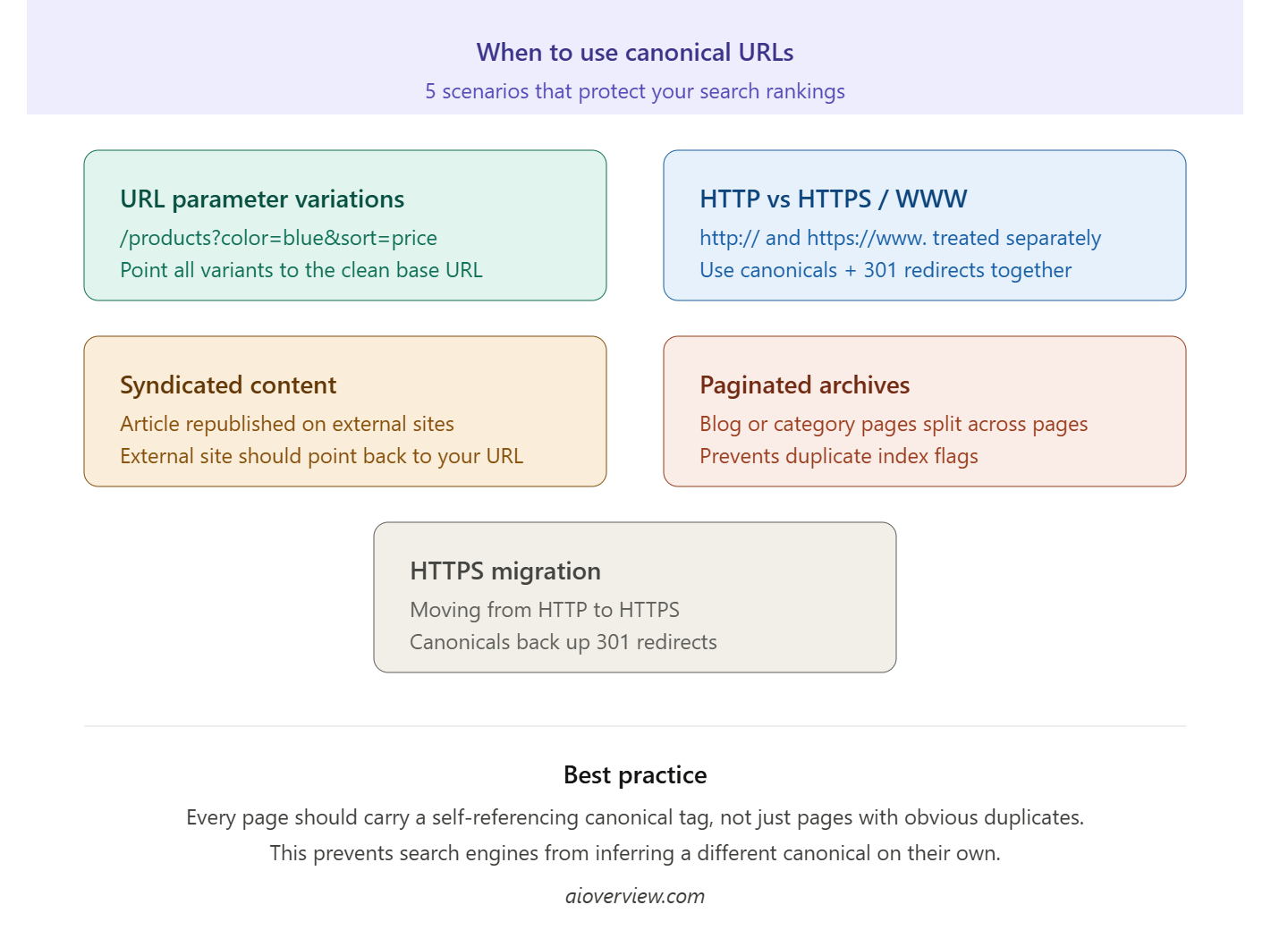
HTTP vs. HTTPS and WWW vs. non-WWW Even minor URL variations like http://example.com, https://example.com, and https://www.example.com are treated as separate pages by search engines. Canonical tags combined with proper 301 redirects prevent these variants from fragmenting your authority.
URL Parameters E-commerce and content-heavy sites often append parameters for tracking, filtering, or sorting: /products?color=blue&sort=price. These create dozens of indexable URLs with nearly identical content. Canonical tags tell search engines to credit the clean base URL.
Paginated Content Blog archives and product category pages broken into multiple pages can trigger duplicate content flags. Using canonicals on paginated series, or implementing pagination markup correctly, keeps your indexing clean.
Content Syndication Where you syndicate your content on other websites, the syndicating websites should have canonical tags that point to the origin of your URLs. In this way, you ensure that you get credit as the author of the article.
HTTPS Migration When moving a site from HTTP to HTTPS, canonical tags serve as a backup signal alongside 301 redirects, reducing the risk of authority loss during the transition.
How to Implement Canonical Tags Correctly
Getting canonicals right is straightforward, but a few missteps can neutralize their effectiveness.
Self-referencing canonicals are a best practice. It’s essential for each page to have a self-referential canonical tag, not only duplicate-prone pages. Otherwise, a search engine may create a canonical that is not intended by the page owner.
Be consistent with your preferred URL format. Should your canonical tags have trailing slashes in some instances and lack them in others, you will create confusion. Choose one method and stick to it for all content on your site.
Avoid canonical chains. If Page A canonicalizes to Page B, and Page B canonicalizes to Page C, search engines may ignore the chain entirely. Always point directly to the final preferred URL.
Don't use canonicals as a substitute for redirects. A canonical tag is a hint, not a directive. Google can and sometimes does override canonical signals if it determines a different URL is more authoritative. For truly redundant pages you want removed from circulation, a 301 redirect is the stronger tool.
Verify with Search Console. The URL Inspection feature in Google Search Console reveals which URL is being considered the canonical URL by Google for the page. If this differs from what your tag mentions, it indicates some mismatch within your internal linking or overall website architecture.
Canonical Tags vs. Other Duplicate Content Solutions
Canonical tags are one of several tools available, and knowing when to use each matters.
The noindex meta tag excludes the page from the search engine index completely, which should be used for pages like admin pages, thank-you pages, or any page whose link equity you do not want to build up. In cases where the page can still be accessed but does not have to have its own page ranking, canonicals are more appropriate to use.
301 redirects direct people and web crawlers to the new URL and also pass over link equity. 301 redirects are very useful if you want to get rid of an old page or move a page to a new location.
In cases involving multilingual websites, the hreflang tag comes into play, which might overlap with canonicals.
The Bottom Line
Canonical URLs cannot simply be an afterthought to SEO. It is an essential component of creating an authoritative website structure. Each time you make something available via various URLs based on factors like parameterization, syndication, HTTP/HTTPS distinction, or even pagination, you run the risk of compromising the ranking potential you have worked so hard to cultivate. Proper use of canonicals helps ensure that your content receives credit for its authority.
Start with a technical SEO audit to identify where duplicate content currently exists on your site, then implement self-referencing canonicals site-wide as a baseline. From there, address specific duplicate scenarios as they arise. It's one of the highest-leverage, lowest-risk improvements you can make to protect your search rankings.
Sources
Google Search Central -- Consolidate duplicate URLs
Google Search Central -- Specify a canonical with rel="canonical"
Google Search Central -- Large site crawl budget management
Google Search Central -- Pagination and incremental page loading
Google Search Central -- SEO starter guide
Ahrefs Blog -- Duplicate content in SEO